Deployment Guide
Complete deployment procedures for the short drama platform infrastructure.
This section covers environment setup, service deployment, configuration management, and deployment best practices for technical operations teams.
1. Overview and Architecture
This document outlines the containerized deployment procedure for the Short Drama Video-on-Demand (VOD) Platform using Docker. The system is designed with a high-availability architecture to ensure robust service delivery for streaming content.
The architecture comprises key components, including a Management Platform, a Load Balancer (HAProxy), Scalable Streaming Servers, and a highly available Main/Backup Database setup.
System Architecture Diagram
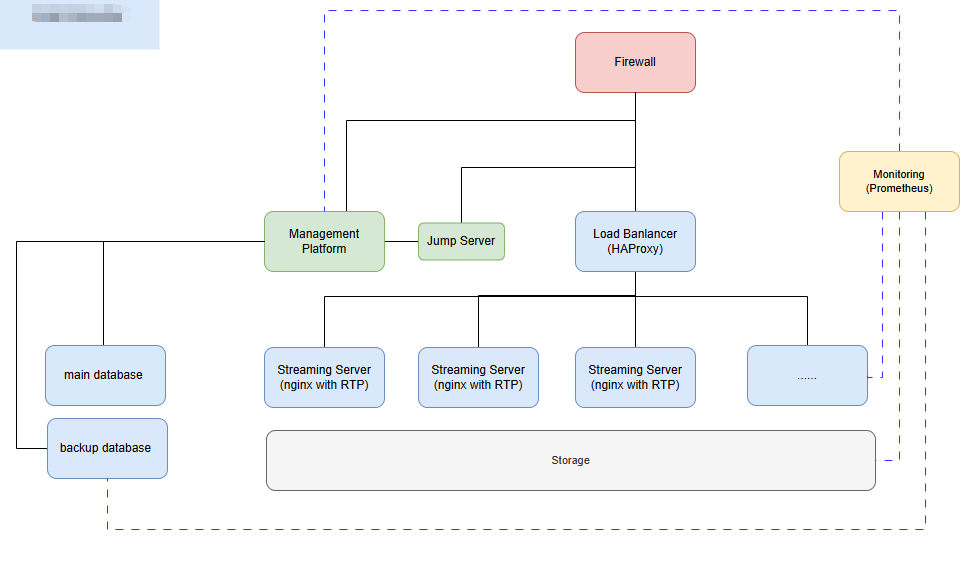
The system is structured as follows, running within a Unitel Datacenter:
- Entry Point: Traffic enters via the Firewall.
- Traffic Distribution: The Load Balancer (HAProxy) distributes requests to the Streaming Servers.
- Core Services:
- Management Platform: Backend for content, user, and data management.
- Jump Server: Secure entry point for maintenance and internal operations.
- Streaming Servers: Multiple instances (Nginx with RTP) for serving video streams.
- Database: High-availability pair (Main Database and Backup Database).
- Monitoring: Prometheus for time-series data collection, metrics storage, and alerting.
2. System Requirements
2.1 Hardware Specifications (Minimum Recommended)
These specifications are minimum recommendations. Scaling should be adjusted based on anticipated user traffic and content library size.
| Component | Role Description | CPU (Cores) | Memory (RAM) | Storage (SSD) | Notes |
|---|---|---|---|---|---|
| Management Platform | Backend administration, content review, data analytics. | 4 | 8 GB | 100 GB | User-specified requirement. Highly recommend high-IOPS SSD. |
| Streaming Server (Nginx/RTP) | Responsible for video stream delivery. | 2 | 4 GB | 200 GB | Horizontally scalable based on concurrent streams. Storage is used for caching. |
| Load Balancer (HAProxy) | L4/L7 traffic distribution and session persistence. | 2 | 2 GB | 50 GB | Monitor CPU usage closely during peak traffic. |
| Main Database | Primary data storage (MySQL). | 8 (or higher) | 16 GB (or higher) | 500 GB+ | Requires high-IOPS storage and high-availability configuration (e.g., replication). |
| Backup Database | Real-time replication of Main Database. | 4 | 8 GB | 500 GB+ | Storage capacity must match the Main Database. |
| Jump Server | Secure gateway for internal network access and operations. | 1 | 2 GB | 50 GB | Minimal requirements, used mainly for SSH access. |
| Monitoring (Prometheus) | Time-series database for metrics collection. | 2 | 4 GB | 100 GB | Depends heavily on the metrics retention period. |
| Host/Cluster OS | The physical or virtual machine running all containers. | Total > Container Needs | Total > Container Needs | - | Docker Compose is used for deployment; for clustering/orchestration, consider Docker Swarm. |
2.2 Software Prerequisites
| Software | Version Requirement | Description |
|---|---|---|
| Host Operating System (OS) | Linux (Ubuntu 20.04+ LTS or CentOS Stream 9+ recommended) | Stable distribution with robust Docker support. |
| Docker Engine | 19.03+ | Container runtime environment. |
| Docker Compose | 1.27+ | Tool for defining and running multi-container applications (local/testing deployment). |
| Firewall/Security Group | Defined Ruleset | Network traffic filtering and necessary port forwarding (e.g., 80, 443, custom streaming ports, 9090 for Prometheus). |
| Git | Latest Stable | Required to clone the platform’s deployment repository. |
3. Deployment Options
3.1 Docker Compose Deployment (Recommended for Initial Setup)
This section details the steps for a quick, localized deployment using Docker Compose. For production, consider adapting these images for Docker Swarm.
3.1.1 Initial Setup on Host Server
-
SSH into the Host Server:
ssh user@host_ip -
Install Docker and Docker Compose (if not present):
- Follow the official Docker documentation for your specific Linux distribution.
-
Clone the Deployment Repository:
git clone [https://repo.com/short-drama-vod/deployment.git](https://repo.com/short-drama-vod/deployment.git)
cd deployment -
Configure Environment Variables:
Edit the .env file within the deployment directory. This file contains critical configuration details.
# Example .env configuration
DB_ROOT_PASSWORD=your_secure_root_password
DB_USER=vod_user
DB_PASSWORD=vod_secure_password
DB_NAME=vod_platform
HA_PROXY_PORT=80
MANAGEMENT_API_PORT=8080
PROMETHEUS_PORT=9090 # New port for monitoring UI
3.1.2 Executing the Deployment
Once the environment variables are set and the necessary configuration files (docker-compose.yml, config/haproxy.cfg, config/prometheus.yml) are in the current directory, use the following command to build and start all containers in detached mode (-d).
-
Build and Start Services:
docker-compose up -d --buildThis command builds any locally defined images and starts all services (Database, Management Platform, Streaming Server, HAProxy, and Prometheus) defined in docker-compose.yml on the internal_network.
-
View Logs (Optional):
To follow the startup progress or diagnose issues, run the logs command without the -d flag initially, or use:
docker-compose logs -f
3.1.3 Verification
Verify that all critical containers are running and healthy.
-
Check Container Status: docker-compose ps
Expected output should show State as Up (and ideally (healthy) for the database).
-
Test Load Balancer Access: Access the public IP or DNS of the host server on the exposed HAProxy port (default 80): curl \-I http://\<host\_ip\>
A successful response (e.g., HTTP/1.1 200 OK) confirms HAProxy is routing traffic to the streaming servers.
-
Test Management Platform Access: The Management Platform is exposed on the host via MANAGEMENT\_API\_PORT (default 8080). curl http://\<host\_ip\>:${MANAGEMENT\_API\_PORT}/health
Verify the API returns a successful health status code.
-
Test Prometheus Monitoring Access (New): Access the Prometheus UI on the exposed port (default 9090): curl http://\<host\_ip\>:${PROMETHEUS\_PORT}/targets
Verify that all targets (Management Platform, Streaming Server, HAProxy) show a UP status.
3.2 Kubernetes Deployment (Production-Ready)
Info
🚀 Coming Soon: Kubernetes Deployment
Kubernetes support is planned for the short drama platform with the following features:
Benefits:
- Scalability: Handle millions of concurrent streams
- Reliability: Self-healing infrastructure with automatic failover
- Efficiency: Optimal resource utilization across clusters
4. Next Steps
Details
🎯 Deployment Complete!
Your short drama platform infrastructure is now successfully deployed. Here’s what to do next:
Immediate Next Steps:
- Verify all services are running and healthy
- Test streaming functionality with sample content
- Configure SSL certificates for production environments
- Set up monitoring alerts in Prometheus