Drama Management
Comprehensive guide for managing short drama content throughout its lifecycle on the platform.
Create Drama
Drama Creation Process
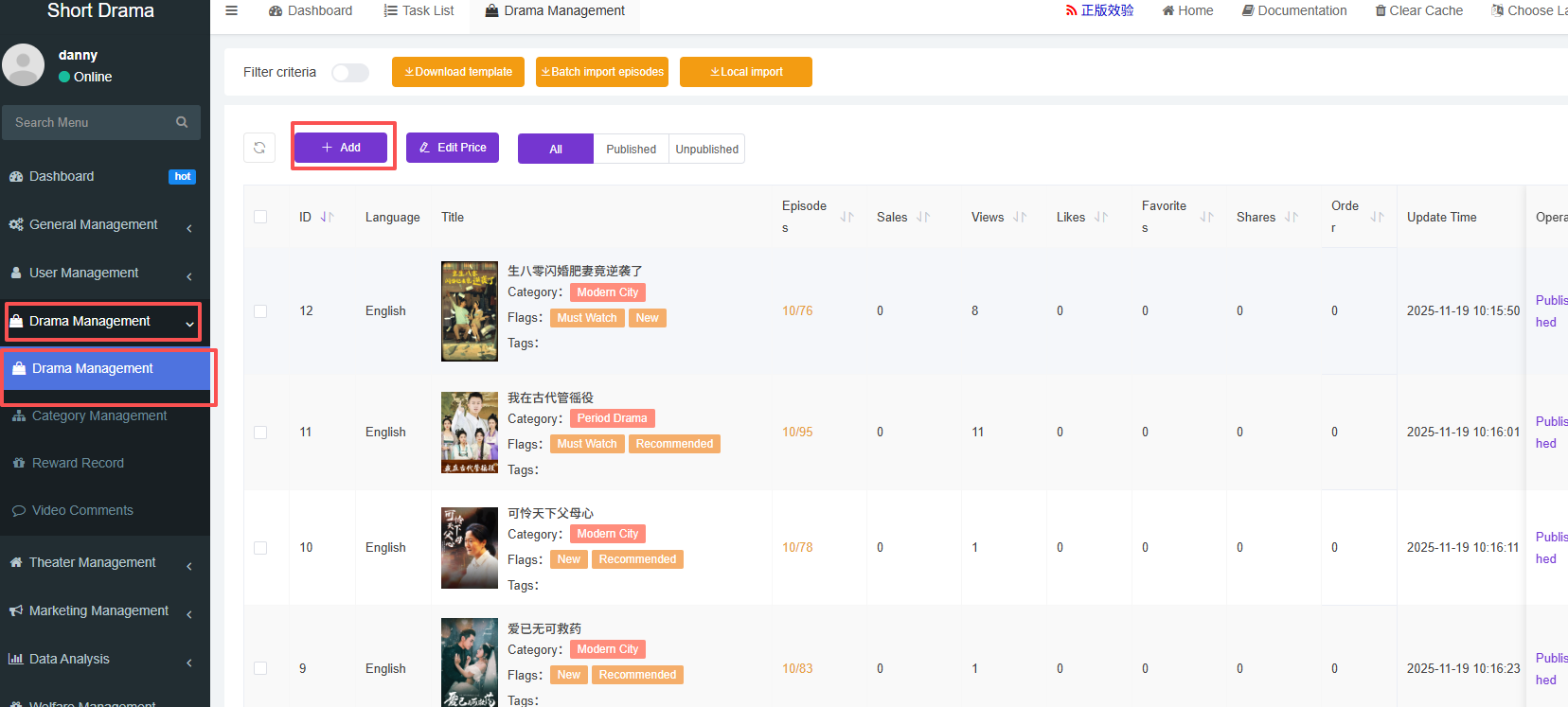
Navigate to drama management and click add
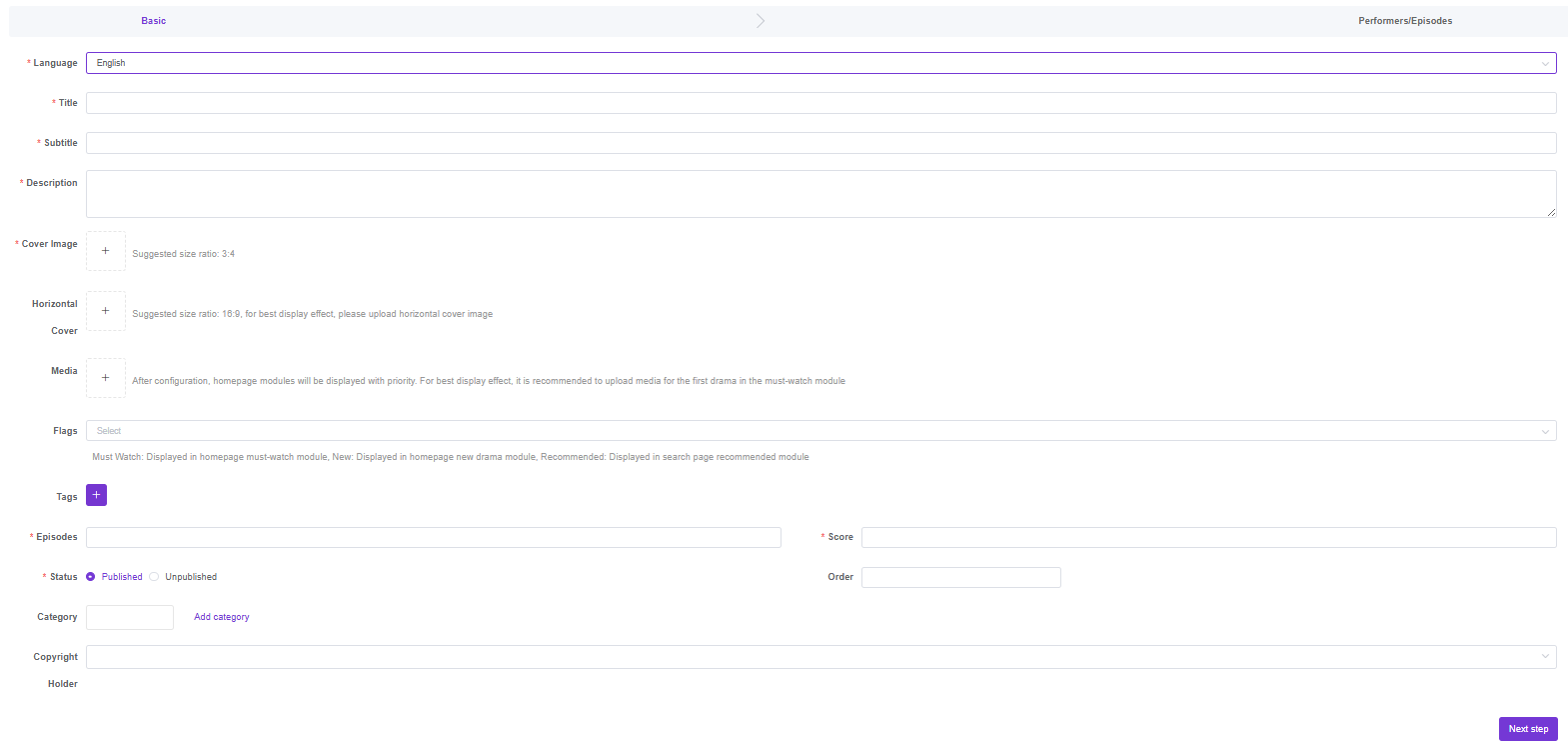
Fill in the basic info of the drama title
Video Upload Methods
When uploading episode videos (including subtitles and thumbnails), the platform supports two storage methods:
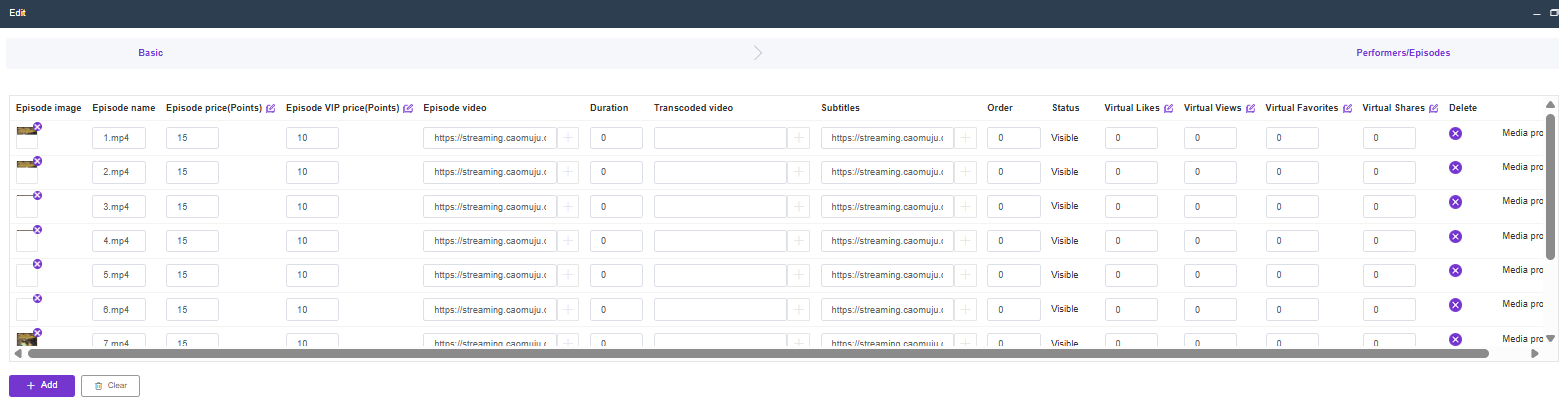
Method 1: Direct Upload to Local Server
Upload video files directly through the web interface. The system will store files on the backend management platform’s server.
Process:
- Click “+” button in the episode creation form
- Select video files from your local computer
- System automatically uploads and stores files locally
- Suitable for: Small to medium scale deployments, testing environments
Method 2: External Streaming Server
Provide URLs to video files hosted on external streaming servers or CDN.
Process:
- Enter direct video URLs in the episode form fields
- Support for both video and subtitle external URLs
- Suitable for: Large scale deployments, professional streaming setups
Supported External Storage:
- CDN services (AWS CloudFront, Alibaba Cloud CDN, etc.)
- Streaming platforms
- External file storage services
- Direct HTTP/HTTPS URLs
Warning
Important: After uploading each episode, remember to set its price. If the price is set to 0, the episode will be available for free to all users. Non-zero prices require users to spend viewing points or purchase access.
Batch Upload via ZIP Package
For efficient bulk content upload, the platform supports automatic parsing and upload of packaged drama content via ZIP files.
ZIP Package Structure
Create a properly structured ZIP file containing:
Automatic ZIP Processing
Upload Process:
- Click “Batch Upload” button on drama creation page
- Select and upload your ZIP package
- System automatically extracts and parses contents
- Files are organized and prepared for upload
Automatic Parsing Features:
- Video Detection: Identifies and catalogs episode video files
- Thumbnail Matching: Links posters/thumbnails to corresponding episodes
- Subtitle Integration: Associates subtitle files with videos
- Metadata Import: Reads drama information from metadata.json
Streaming Server Upload
After ZIP parsing, files can be automatically uploaded to your chosen streaming server:
Supported Streaming Servers:
- Local Streaming Server: Uploads to your local streaming infrastructure
- OSS (Object Storage Service): Aliyun OSS, AWS S3, or compatible services
- CDN Networks: Integration with content delivery networks
- Custom FTP/SFTP: Direct upload to specified servers
Info
Note: Detailed streaming server configuration and setup instructions will be provided later. This feature requires proper server credentials and network configuration.
Automatic URL Population
After successful upload to the streaming server, the system automatically:
Auto-Fills Video URLs:
- Retrieves uploaded video file URLs from the streaming server
- Populates video URL fields for each episode automatically
- Updates episode records with direct streaming links
Auto-Fills Subtitle URLs:
- Gets subtitle file URLs from the streaming server
- Associates correct subtitle files with corresponding episodes
- Supports multiple subtitle languages if provided
Auto-Fills Poster URLs:
- Retrieves drama poster and episode thumbnail URLs
- Updates drama cover image field automatically
- Sets episode thumbnail images for each episode
System Integration:
This eliminates manual URL copying and ensures all media assets are properly linked to your drama content. The system validates all URLs before saving to prevent broken links.
Edit Drama Information
After creating a drama, you can edit its basic information and manage episodes.
Setting Episode Prices
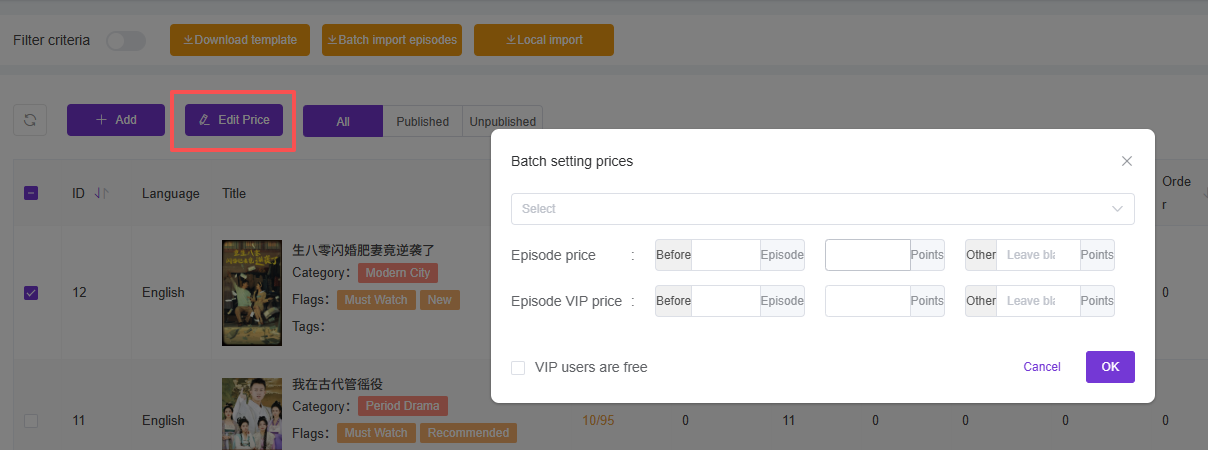
Bulk Price Management
After selecting a drama, you can batch modify prices for multiple episodes at once:
Common Pricing Strategies by Episode Progression:
Strategy 1: Hook Pricing (吸引定价)
- Episodes 1-5: Free (0 points) - Attract viewers
- Episodes 6-15: Low price (5-10 points) - Build engagement
- Episodes 16+: Standard price (15-25 points) - Monetize invested viewers
Strategy 2: Progressive Pricing (递进定价)
- Early Episodes (1-10): 5 points
- Middle Episodes (11-20): 10 points
- Climax Episodes (21-30): 15 points
- Final Episodes (31+): 20 points
Strategy 3: Premium Climax (高潮溢价)
- Regular Episodes: Standard price (10 points)
- Key Plot Episodes: Premium price (20-30 points)
- Season Finale: Highest price (25-50 points)
Tip
Pricing Psychology:
- Early free episodes build audience investment
- Gradual price increases feel natural to engaged viewers
- Key plot episodes can command premium pricing
- Consider your target audience’s spending capacity
Unpublish Drama
To remove the drama from the APP, just unpublish it